AI Legal Preparation Workspace
Run your case before the real court does.
Describe your dispute once and get a complete case-preparation file — not just an AI hearing — before you ever pay a lawyer.
See How CourtRoomAI Works
Three steps from dispute to preparation report.
Upload Your Case
Describe your dispute and upload supporting evidence.
Watch The Hearing
AI lawyers argue both sides while the judge and jury evaluate the case.
Get Your Report
Review strengths, weaknesses, missing evidence, and recommended next steps.
How It Works
- 1Create Your Case
Enter the basics of your dispute.
- 2Upload Evidence
Add documents, photos, or messages (optional).
- 3Run Simulation
Watch AI lawyers argue both sides.
- 4Review Report
Get strengths, weaknesses, and next steps.
Each run produces a fresh transcript and a timestamped preparation report. Quality-failed runs auto-refund the credit — you only pay for runs you actually receive.
Before you go in blind, rehearse the argument.
This is not legal advice. It is a courtroom rehearsal engine.
Live demo gallery
Watch real demo hearings before you pay
See exactly what happens inside a simulation.
Security Deposit Dispute
Small claims · landlord / tenant
- • 2 runs of this case
- • 13 courtroom messages per run
- • 3 jurors react with their own personas
- • Final timestamped preparation report
- • Quality-failed runs auto-refund the credit
Workplace Retaliation Claim
Employment · wrongful termination
- • 5 runs of this case
- • 21 courtroom messages per run
- • 6 jurors react with their own personas
- • Witness Prep + Appeal Review agents
- • Final timestamped preparation report
- • Quality-failed runs auto-refund the credit
Refund & Warranty Dispute
Consumer protection
- • 4 runs of this case
- • 28 courtroom messages per run
- • 12 jurors react with their own personas
- • Witness Prep + Appeal Review agents
- • Two simulation rounds
- • Final timestamped preparation report
- • Quality-failed runs auto-refund the credit
Inside your Case Hub
See exactly what you get
A paid run unlocks a complete workspace, not just a hearing. Click through the tabs to see what lives inside.
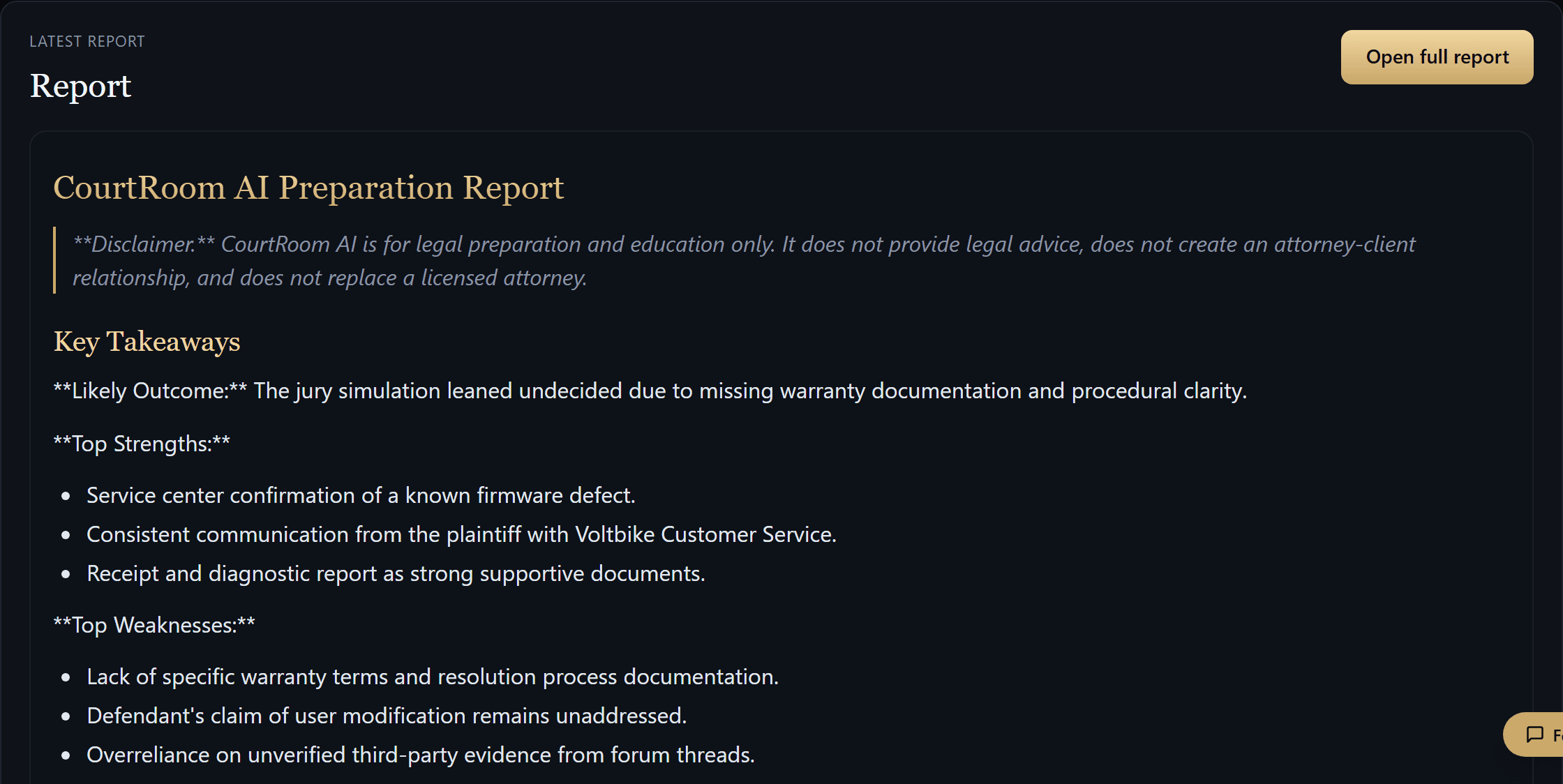
Preparation Report: Strengths, weak points, evidence gaps and next steps — citing real opinions for your state.
What you get
Everything Included
One purchase unlocks a complete Case Hub — not just a hearing. Here’s everything that comes with your case.
Watch AI lawyers argue both sides of your case, turn by turn.
A reasoned ruling and a simulated read of how the hearing leaned.
Strengths, weaknesses, evidence gaps, and your next steps.
Upload your documents so the AI argues against your real evidence.
The full, searchable hearing transcript to re-read, export, and share.
Ask follow-up questions answered from your own case materials.
Verified statutes and legal-aid resources for your jurisdiction.
Every purchase includes multiple runs — refine the facts and run again.
Your case, evidence, and report stay private in your account.
How it flows
Your Product Journey
Start free — you get an AI preview of your case before you ever pay.
- 1Upload Your Case
- 2Receive Free AI PreviewFree · no payment
- 3Unlock Full Courtroom Hearing
- 4Review AI Judge Decision
- 5Get Preparation Report
- 6Improve Case
- 7Re-run Simulation
Your case package
Everything you’ll take to court
You’re not buying an AI chat. You’re leaving with a complete, organized case file — the kind of preparation you’d bring to a lawyer’s office or a courtroom.
One purchase. Multiple runs. The whole file stays in your account.
Build my case file free →Preparation and education only. CourtRoom AI is not legal advice and does not replace a licensed attorney.
Choose how deep you want the simulation to go
One purchase, multiple runs of the same case. Quality-failed runs auto-refund the credit so you only pay for what you receive.
- • First-time users
- • Simple disputes
- • Quick validation
- • Basic courtroom simulation
- • Key weaknesses identified
- • 3 jury reactions
- • Short preparation report
If your case has multiple facts or you want stronger preparation, choose Standard.
- • Best for most cases
- • Small claims, employment, disputes
- • Preparing before legal consultation
- • Full courtroom simulation
- • Witness Prep Agent
- • Appeal Review Agent
- • 6 jury reactions
- • Strong evidence analysis
- • Full preparation report
- • Complex cases
- • Evidence-heavy disputes
- • Users who want maximum preparation
- • Everything in Standard
- • Two simulation rounds
- • 12 jury agents
- • Stronger counterarguments
- • More detailed report
Frequently asked questions
Is this legal advice?
Do I need a subscription?
What do I get at the end?
Can I use the report in court?
How accurate is the simulation?
Explore More Case Types
Don’t see your dispute above? Start from a category instead.
Deposits, repairs, lease disagreements
Start a case →Employment DisputesTermination, retaliation, unpaid wages
Start a case →Business DisputesPartner conflict, unpaid invoices, contracts
Start a case →Family AgreementsSupport, custody, separation-related disputes
Start a case →Contractor DisputesUnfinished work, payment issues, poor quality
Start a case →Refund & Warranty ClaimsDefective products, denied refunds, service issues
Start a case →Neighbor & PropertyNoise, boundaries, damage, shared spaces
Start a case →Debt & Payment ClaimsLoans, repayment promises, unpaid balances
Start a case →Vehicle & Accident ClaimsDamage, fault, repair costs, insurance disputes
Start a case →Every simulation is for preparation and education only. CourtRoom AI does not provide legal advice or predict court outcomes.